
 create new ticket
 check ticket status
Security Roles can be created and assigned to users to control their level of access. Each permission variable controls a specific section, panel or action.
- The preset security roles provide a base permission setup for various online user roles, but can still be modified as needed.
- The Approval Page > Cart Approval permission is required for a contact to be selectable as an approver of another user's online orders.
- The quickest way to add a new security role similar to an existing one, is to duplicate an existing security role, and make a few adjustments.
- Online Security Roles can also be added or removed from Contacts while editing a Contact on the CRM.
Learn more about Editing Contacts - Online Ordering Settings. - Once a security role exists, it can be added to Settings > Customer > Defaults > Edit Customer Default > Online Ordering > Contact Roles, to automatically assign the desirable security role to any New Contacts that Self Register on an Online Ordering Portal that has the Customer Default Associated.
Learn more about W2P Portal Access Settings
FAQ - Can I Set a Different Customer Default on Each Portal?
FAQ - What are Defaults and Where are they Used?
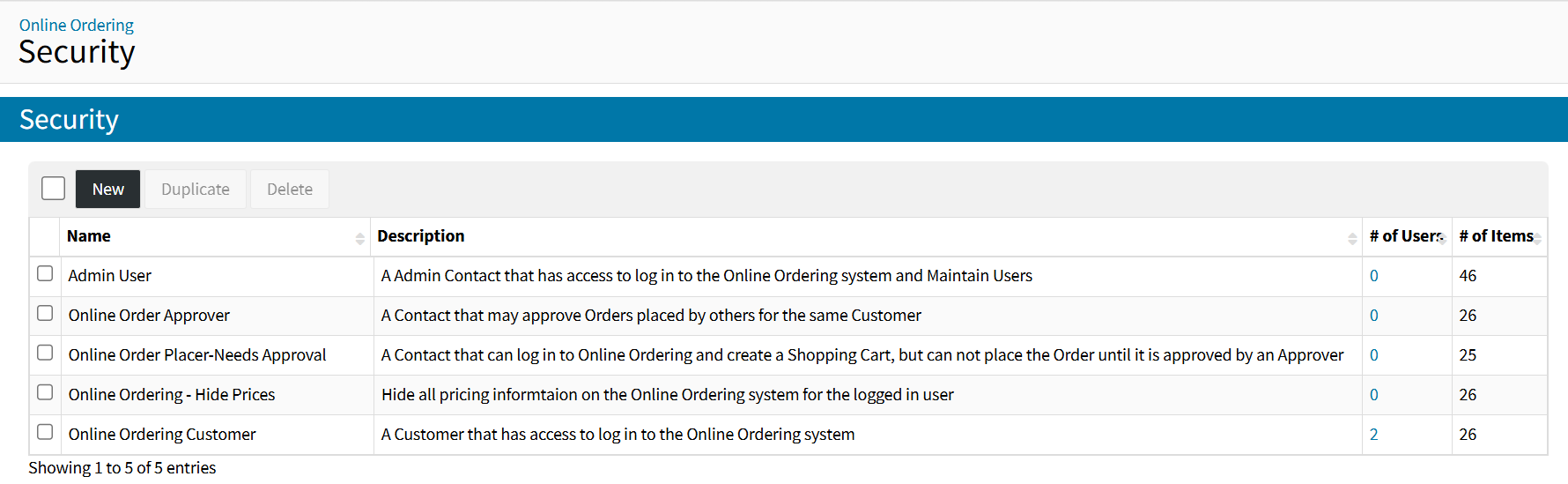
Online Ordering > Security
ADDING SECURITY ROLES
- Click the {New} button
- Name the security role
- Add a Description to identify the uniqueness of the security role
- Select desirable Permissions, then click the {Save} button
- Online Security Role Permissions are defined at the bottom of this article
ADDING CONTACTS TO SECURITY ROLES
- While editing a security role, click the {Add} button in the Contacts section
- Filter/Search & Select the contact(s) you want to add to the security role, then click the {Add} button
REMOVING CONTACTS FROM SECURITY ROLES
Once a Contact is assigned to a security role, they can be removed by selecting the Contact from the Security Role Contact List and clicking the {Remove} button.
EDITING SECURITY ROLES
Once a Security Role exists, it can be edited by clicking the Security Role Name.
DUPLICATING SECURITY ROLES
Once a Security Role exists, it can be duplicated by selecting the Security Role from the Security Role List and clicking the {Duplicate} button.
DELETING SECURITY ROLES
Once a Security Role exists, it can be deleted by selecting the Security Role from the Security Role List and clicking the {Delete} button.
ONLINE SECURITY ROLE PERMISSIONS
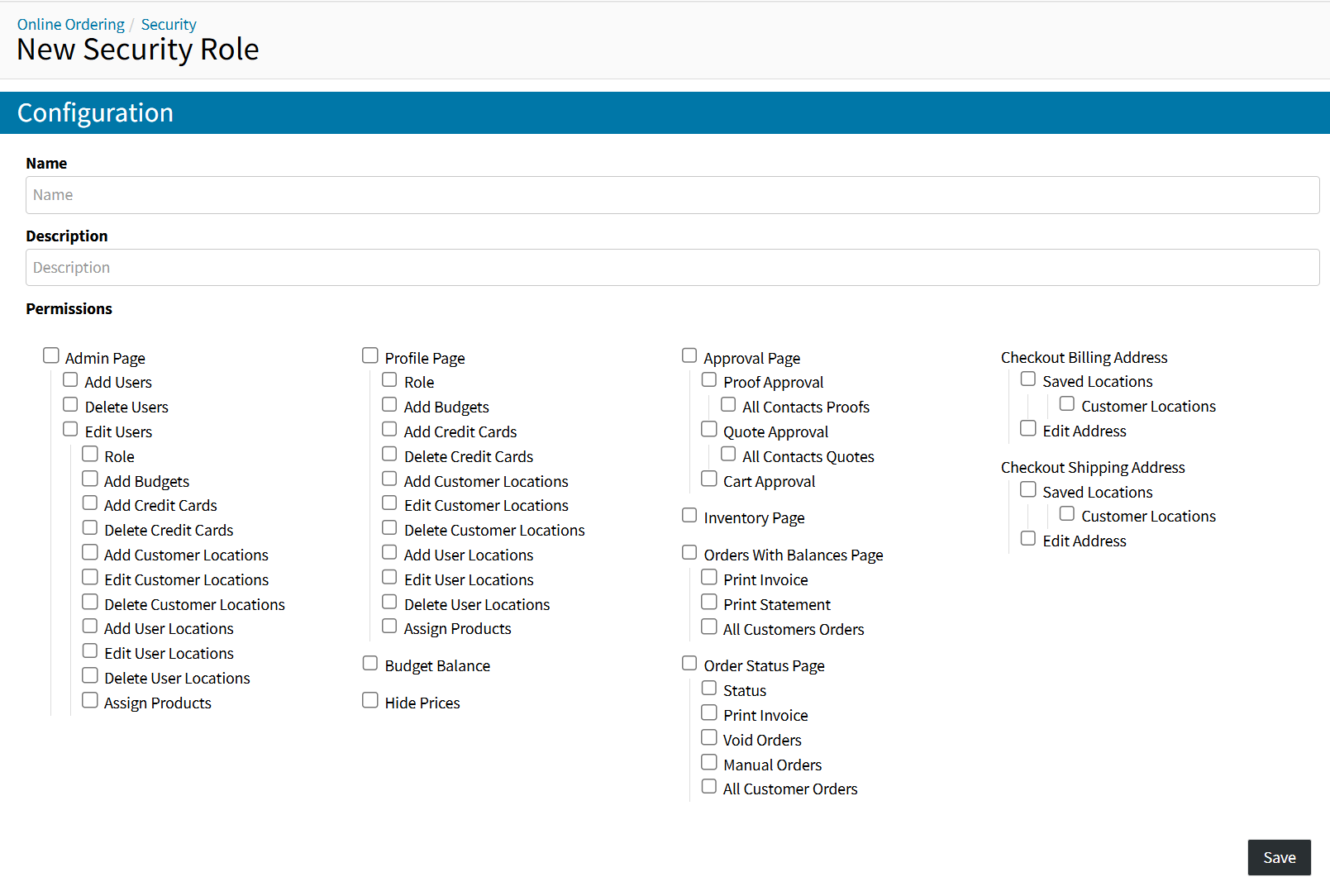
- Admin Page - Access to the Online Ordering Admin Page
Allows the user to see all users registered under their customer.- Add Users - Ability to create new contacts within their customer, with access to online ordering
- Delete Users - Ability to delete online ordering contacts from their customer
- Edit Users - Access to edit information of their company contacts
- Role - Ability to assign roles
- Add Budgets - Ability to add a budget
- Add Credit Cards - Ability add credit cards
- Delete Credit Cards - Ability to delete credit cards
- Add Customer Locations - Ability to add company billing or shipping locations
- Edit Customer Locations - Ability to edit company billing or shipping locations
- Delete Customer Locations - Ability to delete company billing or shipping locations
- Add User Locations - Ability to add contact billing or shipping locations
- Edit User Locations - Ability to edit contact billing or shipping locations
- Delete User Locations - Ability to delete contact billing or shipping locations
- Assign Products - Ability to grant or restrict access to online ordering portal products
- Profile Page - Access to one's own contact profile to edit personal information
- Role - Ability to assign roles
- Add Budgets - Ability to add a budget
- Add Credit Cards - Ability add credit cards
- Delete Credit Cards - Ability to delete credit cards
- Add Customer Locations - Ability to add company billing or shipping locations
- Edit Customer Locations - Ability to edit company billing or shipping locations
- Delete Customer Locations - Ability to delete company billing or shipping locations
- Add User Locations - Ability to add contact billing or shipping locations
- Edit User Locations - Ability to edit contact billing or shipping locations
- Delete User Locations - Ability to delete contact billing or shipping locations
- Assign Products - Ability to grant or restrict access to online ordering portal products
- Budget Balance - Allows the user to access their company's budgets and to allocate budget funds for their orders
- Hide Prices - Restricts the contact from viewing product prices on Online Ordering Portals
- Approval Page - Access to the Online Ordering Approvals Page
- Proof Approval - Access to one's own proof approvals section
- All Contacts Proofs - Access to all company contacts proof approvals
- Quote Approval - Access to one's own quote approvals section
- All Contacts Quotes - Access to all company contacts quote approvals
- Cart Approval - Access to the cart approvals section of the approvals page
This security setting is required for a contact to be selectable as an approver of another user's online orders.
- Proof Approval - Access to one's own proof approvals section
- Inventory Page - Access to the Online Ordering Inventory Page
Allows the user to see the status of any Finished Customer Good under their customer.
- Orders With Balances - Access to the Online Ordering Orders With Balances Page
- Print Invoice - Ability to print the customer default invoice document for any order with an outstanding balance available to the contact
- Print Statement - Ability to print the customer default statement document if there is an outstanding balance on posted orders
- All Customer Orders - Access to all company contacts orders with outstanding balances
- Order Status Page - Access to the Online Ordering Order Status Page
- Status - Ability to see the current queue status of order items
- Print Invoice - Ability to print the customer default invoice document for any order available to the contact
- Void Orders - Ability to see voided orders as part of the Order Status Page
- Manual Orders - Ability to see non-online orders as part of the Order Status Page
- All Customer Orders - Access to all company contacts orders based on void and manual order security settings
- Checkout Billing Address
- Saved Locations - Ability to select contact billing locations from the billing address dropdown menu
- Customer Locations - Ability to select customer billing locations from the billing address dropdown menu
- Edit Address - Ability to manually edit the billing address
- Saved Locations - Ability to select contact billing locations from the billing address dropdown menu
- Checkout Shipping Address
- Saved Locations - Ability to select contact billing locations from the billing address dropdown menu
- Customer Locations - Ability to select customer shipping locations from the shipping address dropdown menu
- Edit Address - Ability to manually edit the shipping address
- Saved Locations - Ability to select contact billing locations from the billing address dropdown menu