
 create new ticket
 check ticket status
Products are versatile and can be utilized for Online Ordering, Point of Sale, and Added to Quotes/Orders as a predetermined Order Item Template.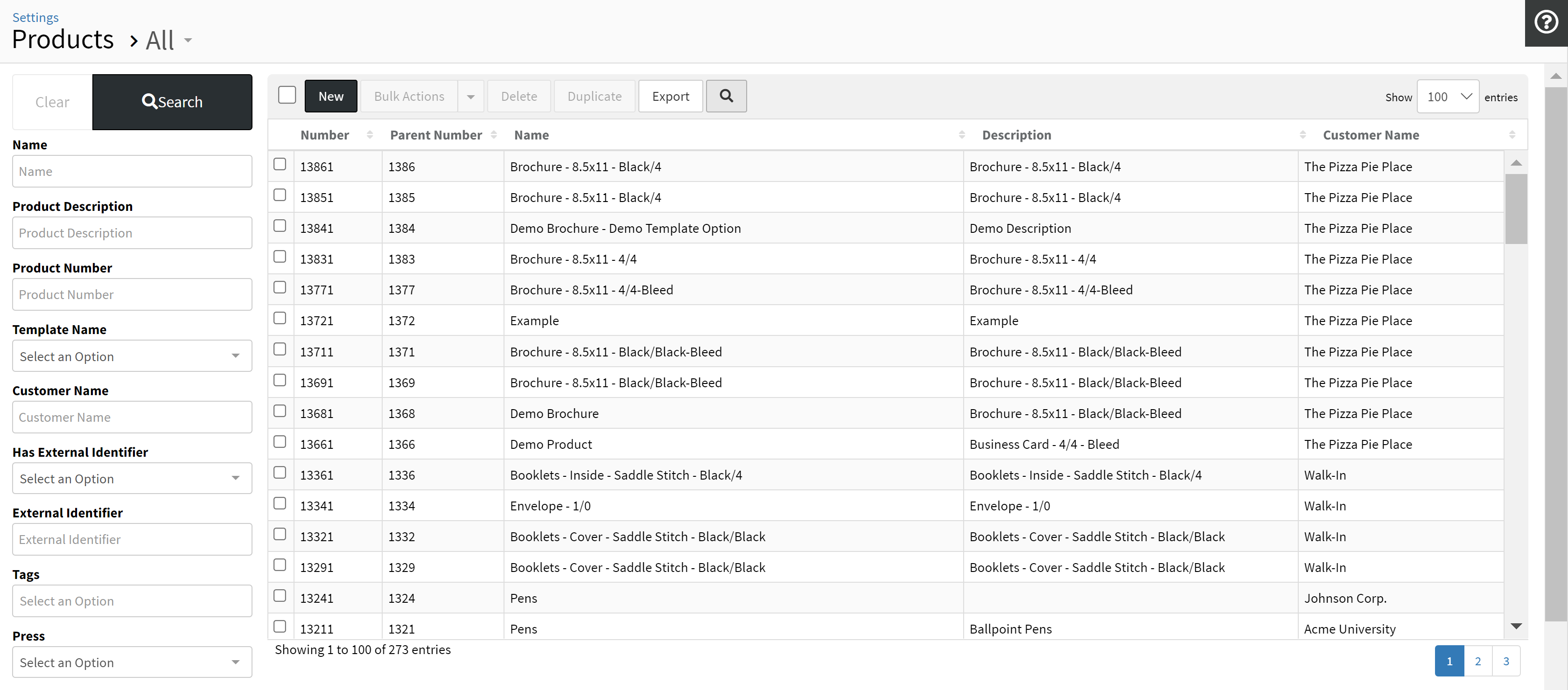
Search Filters Panel
Filter your product list by the available fields to narrow down your product list to a specific criteria to quickly access the product(s) you want to edit.
{New}
Creates a new Parent Product Container associated with a Customer from your selection.
- Each Product Item added within a Parent Product Container will be associated with the Customer of the Parent Product, listing out all Product Items at the Customer Level in CRM.
- If the CRM > Customer > Actions > Edit > Online Ordering > Automatically Grant Contacts Product Access > Is "Yes", all new Product Items created, within a Parent Product Container associated with the customer, will automatically grant all currently existing contacts product access. All new contacts created under the customer will be automatically granted Product Item access to all currently existing products.
Learn more about Creating a New Product Item.
{Duplicate}
Duplicates the selected Product Item(s) into a new Product Parent Container.
- If you need to duplicate a Product Item within an existing Parent Product Container, click on the Parent Number, and Duplicate the Product Item within the Parent Product Container.
- Keep Portal Access
- Yes - The currently associated Portals of the Product Item will be kept, and the selected Customer's associated Default Portals will be added.
- No - The currently associated Portals of the Product Item will be removed, and the selected Customer's associated Default Portals will be added.
- Keep Contact Access
- Yes - The currently associated Contacts of the Product Item will be kept, and the selected Customer's setting to Automatically Grant Contacts Product Access will determine if all currently associated contacts of the selected Customer will be added.
- No - The currently associated Contacts of the Product Item will be removed, and the selected Customer's setting to Automatically Grant Contacts Product Access will determine if all currently associated contacts of the selected Customer will be added.
{Bulk Actions}
Quickly update information on one or more Selected Product Items without having to edit them individually or having to enter the Product Item at all. The system will determine if a recalculation needs to be done based on the Bulk Actions tool being used and the fields that are being updated.
- From Bulk Actions > Products, the Assigned To, Status, and Tags can be Bulk Removed by entering the existing value and selecting Bulk Remove.
- From Bulk Actions > Stock, Changing the associated stock of a Product Item will automatically adjust the Run Size based on the width and length of the selected stock
{Delete}
Deletes the selected Product Item(s).
{Export}
Exports all Product Items from the Product List depending on the currently Filtered Search.
{Toggle Search Filters Magnifying Glass}
Temporarily hides the Search Filters Panel, to expand the Product List View, until the page is refreshed.
Product List Table
- Number - Product Item Number
- Parent Number - Parent Product Container Number
- Name - Product Item Name
- Description - Product Item Description
- Customer - Products associated Customer