
 create new ticket
 check ticket status
You won't need it until it is Deleted. Luckily, DocketManager allows your to easily Restore deleted items with only a few clicks.
Settings > Admin > Deleted
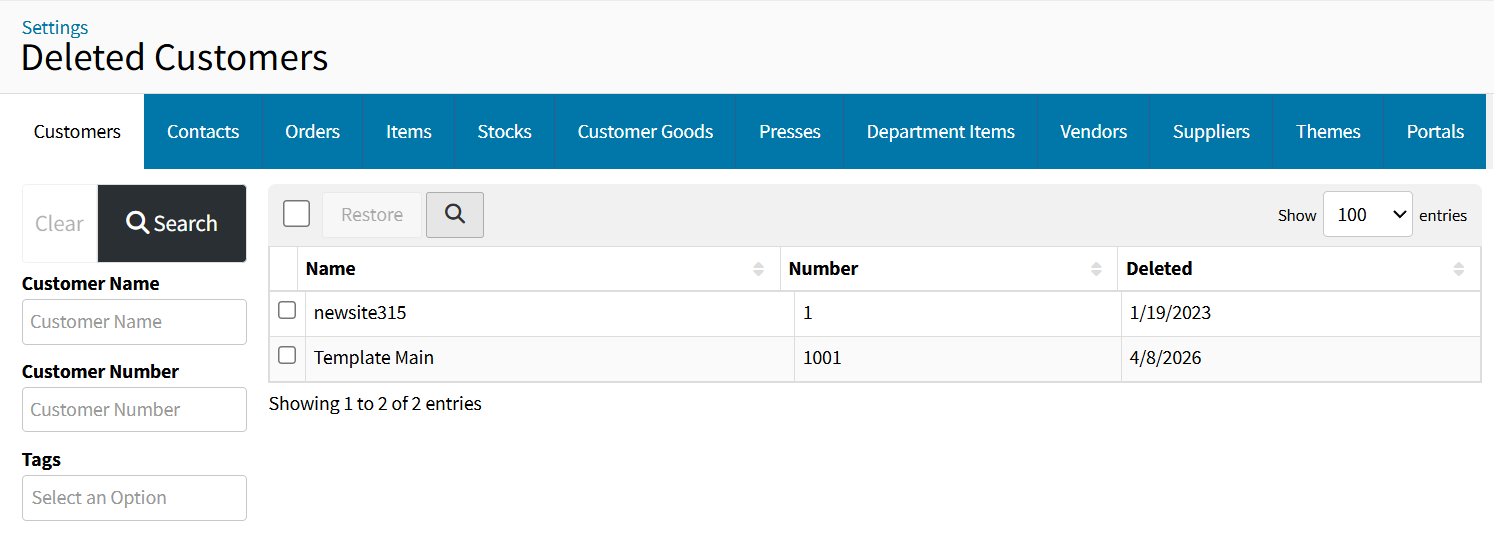
- Select the deleted category tab of the element you want to restore.
- When the list is extensive you can utilize filters on the left-hand side to narrow down the results.
- Optionally Sort your results by using the available column headers.
- Click the checkbox of the desirable element from the results list, and click {Restore}.
Customers
Filter your deleted customers by Customer Name, Customer Number, or the Customer Tags.
Contacts
Filter your deleted contacts by Contact Name, Contact Tags, Customer Name, or the Customer Number.
The Deleted Contact of a Deleted Customer won't display in the deleted contacts list until the customer is restored.
Orders
Filter your deleted Orders/Quotes by Type, Order/Quote Number, or the Order/Quote Name.
Items
Filter your deleted Order/Quote/Product/Group Template Items by Item Number, Item Name, Item Type, or the Order/Quote/Product/Group Template Number.
Stocks
Filter your deleted Stocks by Stock Name, Supplier Name, or the Supplier Code.
Customer Goods
Filter your deleted Customer Goods by Customer Good Name, Customer Good Description, Customer Name, or the Customer Number.
Presses
Filter your deleted Presses by Press Name, Press Format, or the Press Group.
Department Items
Filter your deleted Department Items by Department Item Name, Department Item Group, or the Department.
Vendors
Filter your deleted Vendors by Vendor Name.
Suppliers
Filter your deleted Suppliers by Supplier Name.
Themes
Filter your deleted Themes by Theme Name.
Portals
Filter your deleted Portals by Portal Name.